XenForo 2 Soru konuları - Question Threads -Türkçe

XF 2.0 XenForo 2 Soru konuları - Question Threads -Türkçe Bug fixes 2.0.2

indirmek için izniniz yok
Bu eklenti, add-ons XenForo 2.0.X ile uyumlu ve stabil olarak çalışmaktadır.
Fixed bugs

  • Question and best answer marks are displaying correctly in tags search pages
  • Users with zero best answers will not appear in "Most best answers" list (@katsulynx)
  • Fixed some bugs with threads merging (@Recep Baltaş)
Now you can't merge two questions with best answers.

Question Threads properties are fully depend on target thread. The result of merging a solved question with best answer to a simple thread will be a simple thread.
  • Beğendim
Tepkiler: forensis
New features
  • Added permission: "Mark own post in question as best answer" which is set to No by default
Fixed bugs
  • Question and best anwer marks are displaying correctly in "What's new" page
Fixed bugs
  • Fixed an issue where the best answer icon is not changing in style settings @bolibick
  • Fixed an issue where the best answer icon would stay "diamond" after changing it in style settings @bolibick
  • Fixed an issue where an option to convert thread to question was appearing when editing every post in that thread (not only when editing first post)
How to upgrade?
  1. Download an addon archive and unpack it somewhere
  2. Open upload folder and move all folders there to your forum root directory (with overwriting if needed)
  3. In admin panel go to "Add-ons" section and upgrade "Question Threads" addon
Important! If you can't upgrade an addon and seeing "Version mismatch" message than you need to execute one simple SQL query (for example, it can be done via phpMyAdmin):

Kod:
UPDATE `xf_addon` SET `version_id` = 1020470 WHERE `title` = "Question Threads"

This is happening because I screwed up version id for previous (1.2.4) release.
New features
  • Added an option to mark already created ordinary thread as question when editing first post in the question
Fixed bugs
First two bugs were found by @Mr Lucky. They are fixed now!
  • Fixed an issue where best answer icon was replaced with horribly looking icon name text
  • Fixed an error related to emailing system that appears after uninstalling addon
  • Fixed another issue with questions converting to ordinary threads when editing first post in the question
  • Fixed an issue where "Is question" checkbox was or was not selected incorrectly
  • Fixed an annoing issue where saving forum settings with "This forum is for questions only" enabled would always start redundant "Converting threads to questions" process every time
How to upgrade?
  1. Download an addon archive and unpack it somewhere
  2. Open upload folder and move all folders there to your forum root directory (with overwriting if needed)
  3. In admin panel go to "Add-ons" section and upgrade "Question Threads" addon
  4. (Not likely to happen) If best answer icon disappeared after upgrading then go to "Admin CP -> Appearence -> Style properties -> Question threads colors" and select any best answer icon. Clear the cache (usually Ctrl + F5) of the thread list page.
Fixed bugs
  • Fixed an issue where the question in questions only forum would become an ordinary thread after editing in threads list page
  • Phrases "Best answer" and "Not the best answer" can be translated via phrases now!
notifications_update.webp

Bildirimler Güncelleme 1.2
Ana Özellikler
Addon şimdi thread watcher'larını destekliyor
Tüm iplik vektörleri çözülmüş / çözülmemiş / en iyi cevaplı uyarıları alacaktır.
Addon şimdi, soruya abone olan izleyicilere e-posta bildirimleri gönderebilir!

Diğer özellikler

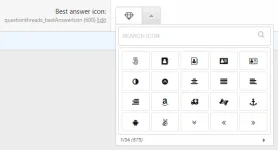
En iyi cevap simgesi için güzel iconpicker
best_answer_icon.webp
Zaten oluşturulmuş iplik düzenlenirken "Soru var" onay kutusu eklendi

Sabit hatalar
Eklenti kaldırıldıktan sonra yedekli uyarılar kaldırılmadığında bir hata düzeltildi
Bazı yerlerde "yalnızca sorular" forumu için "Post thread" ve "Konu title" ifadelerinin doğru "Post question" ve "Question title" ifadeleri
  • Beğendim
Tepkiler: rezan ve FivemTurk
Kişiselleştirme

Tema editörü

Ayarlar Renkler

  • Mobil kullanıcılar bu fonksiyonları kullanamaz.

    Alternatif header

    Farklı bir görünüm için alternatif header yapısını kolayca seçebilirsiniz.

    Görünüm Modu Seçimi

    Tam ekran ve dar ekran modları arasında geçiş yapın.

    Izgara Görünümü

    Izgara modu ile içerikleri kolayca inceleyin ve düzenli bir görünüm elde edin.

    Resimli Izgara Modu

    Arka plan görselleriyle içeriğinizi düzenli ve görsel olarak zengin bir şekilde görüntüleyin.

    Yan Paneli Kapat

    Yan paneli gizleyerek daha geniş bir çalışma alanı oluşturun.

    Sabit Yan Panel

    Yan paneli sabitleyerek sürekli erişim sağlayın ve içeriğinizi kolayca yönetin.

    Box görünüm

    Temanızın yanlarına box tarzı bir çerçeve ekleyebilir veya mevcut çerçeveyi kaldırabilirsiniz. 1300px üstü çözünürler için geçerlidir.

    Köşe Yuvarlama Kontrolü

    Köşe yuvarlama efektini açıp kapatarak görünümü dilediğiniz gibi özelleştirin.

  • Renginizi seçin

    Tarzınızı yansıtan rengi belirleyin ve estetik uyumu sağlayın.

Geri