
Ücretli [XenGenTr] Hesap Yönetim Merkezi - Account Management Center - Ürün Özellikleri
![[XenGenTr] Hesap Yönetim Merkezi - Account Management Center](/data/dbtechEcommerce/productIcons/0/65.png?1785436544)
Hesap güvenliğini ve kullanıcı gizliliğini ön planda tutan gelişmiş hesap yönetim sistemi. Kullanıcıların hesaplarını kilitlemesine, anonimleştirmesine ve tüm işlemleri güvenli şekilde yönetmesine olanak tanır.
-
 xgtHesapYonetim.png
 -
 xgt_hesap_yonetimi_anonimlestirme_1.png
 -
 xgt_hesap_yonetimi_anonimlestirme_2.png
 -
 xgt_hesap_yonetimi_anonimlestirme_3.png
 -
 xgt_hesap_yonetimi_anonimlestirme_4.png
 -
 xgt_hesap_yonetimi_anonimlestirme_5.png
 -
 xgt_hesap_yonetimi_anonimlestirme_6.png
 -
 xgt_hesap_yonetimi_anonimlestirme_7.png
 -
 xgt_hesap_yonetimi_anonimlestirme_8.png
 -
 xgt_hesap_yonetimi_anonimlestirme_9.png
 -
 xgt_hesap_yonetimi_anonimlestirme_10.png
 -
 xgt_hesap_yonetimi_anonimlestirme_11.png
 -
 xgt_hesap_yonetimi_kilitleme_1.png
 -
 xgt_hesap_yonetimi_kilitleme_2.png
 -
 xgt_hesap_yonetimi_kilitleme_3.png
 -
 xgt_hesap_yonetimi_kilitleme_4.png
 -
 xgt_hesap_yonetimi_kilitleme_5.png
 -
 xgt_hesap_yonetimi_kilitleme_6.png
 -
 xgt_hesap_yonetimi_kilitleme_7.png
 -
 xgt_hesap_yonetimi_Yarım Sayfası.png
 -
 xgt_hesap_yonetimi_acp_secenekler.png
 -
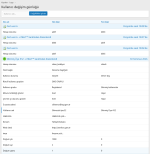 xgt_hesap_yonetimi_acp_log.png
Genel bakış Özellikler Telif hakkı bilgisi Güncellemeler (1) Forum konusu
Özellikler
- Süreli hesap kilitleme sistemi
- SMS veya e-posta ile 6 haneli güvenlik doğrulaması
- Otomatik kilit süresi takibi ve kilit kaldırma
- Güvenli hesap anonimleştirme sistemi
- Yönetilebilir anonimleştirme bekleme süresi
- Anonimleştirme talepleri için yönetici kontrolü
- Kullanıcı ID ve içerik ilişkilerini koruyan anonimleştirme
- Özelleştirilebilir anonim kullanıcı adı —
Silinmiş Üye #29 - Anonim kullanıcıları belirlenen kullanıcı grubuna taşıma
- Konu ve mesajları koruyarak kullanıcı verilerini anonimleştirme
- Detaylı hesap işlem kayıtları
- IP adresi ve cihaz/tarayıcı bilgisi kayıtları
- Filtrelenebilir işlem geçmişi
- Kullanıcı profili üzerinden yönetici kontrolleri
- KVKK ve kişisel veri yönetimi süreçlerini destekleyen yapı
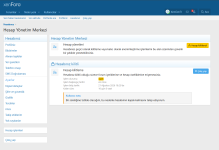
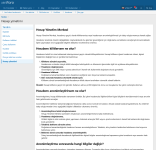
Hesap kilitleme nasıl çalışır?
1. Adım — Kilitleme işlemi başlatılır
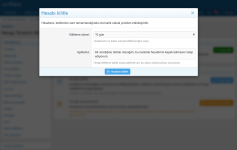
Kullanıcı Hesap Yönetim Merkezi üzerinden Hesabımı Kilitle seçeneğini kullanır. Hesabın ne kadar süreyle kilitli kalacağını belirler ve isterse işlemle ilgili bir açıklama ekler.
2. Adım — Güvenlik doğrulaması yapılır
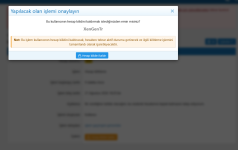
İşlem doğrudan uygulanmaz. Hesap sahibinin güvenliğini korumak ve yetkisiz işlemleri önlemek amacıyla kullanıcıdan ek doğrulama istenir. Doğrulama işlemi, sistem yapılandırmasına göre SMS veya e-posta ile gönderilen 6 haneli tek kullanımlık doğrulama kodu kullanılarak tamamlanır.
3. Adım — Hesap kilitlenir
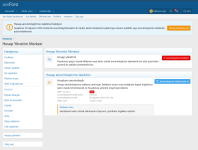
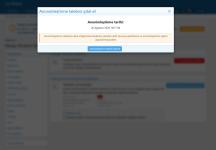
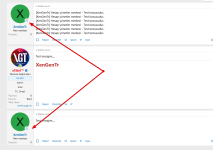
Onay işlemi tamamlandıktan sonra hesap belirlenen süre boyunca kilitlenir. Kullanıcı hesabına erişse dahi forumu normal şekilde kullanamaz ve hesabının kilitli olduğu konusunda bilgilendirilir.
4. Adım — Kilit süresi takip edilir
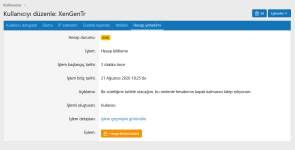
Başlangıç ve bitiş tarihleri sistem tarafından kayıt altına alınır. Yapılan işlem ayrıca işlem kayıtlarına eklenir.
5. Adım — Süre sonunda hesap otomatik olarak açılır
Belirlenen kilitleme süresi sona erdiğinde sistem hesabın kilidini otomatik olarak kaldırır. Kullanıcının grubunu veya temel XenForo hesap yapısını değiştirmeye gerek kalmaz.
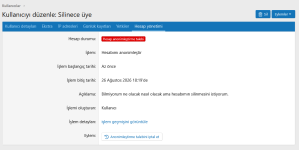
Yönetici kontrolü: Yönetici gerekli durumlarda kullanıcının mevcut hesap durumunu görüntüleyebilir, aktif kilitleme işlemini inceleyebilir ve gerektiğinde kilidi kaldırabilir.
Hesap anonimleştirme nasıl çalışır?
1. Adım — Anonimleştirme talebi oluşturulur
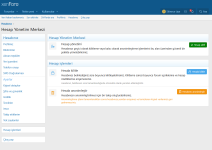
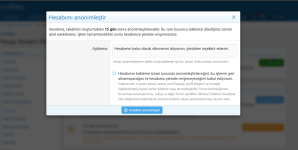
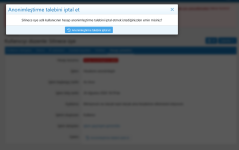
Kullanıcı, Hesap Yönetim Merkezi üzerinden hesabını anonimleştirmek için talep oluşturur. İşlem öncesinde anonimleştirmenin hesap üzerindeki etkileri kullanıcıya açıkça gösterilir.
2. Adım — Güvenlik doğrulaması yapılır
Anonimleştirme, hesap üzerinde kapsamlı ve geri alınması mümkün olmayan değişiklikler oluşturabileceği için talep doğrudan işleme alınmaz. Hesabın gerçek sahibi olduğunu doğrulamak amacıyla kullanıcıya, sistem yapılandırmasına göre SMS veya e-posta üzerinden 6 haneli tek kullanımlık doğrulama kodu gönderilir. Doğrulama başarıyla tamamlanmadan anonimleştirme talebi oluşturulamaz.
3. Adım — Anonimleştirme talebi bekleme sürecine alınır
Güvenlik doğrulaması tamamlandıktan sonra anonimleştirme hemen gerçekleştirilmez. Talep, yönetici tarafından belirlenen “Anonimleştirme bekleme süresi” boyunca sistemde bekletilir.
Bu süre site yöneticisi tarafından yapılandırılabilir. Böylece anonimleştirme işleminin ne kadar süre sonra uygulanacağı forum yönetiminin kontrolünde olur.
4. Adım — Yönetici talebi takip edebilir
Bekleme süresi boyunca anonimleştirme talebi yönetici tarafında görüntülenebilir ve süreç kontrol altında tutulabilir. Yönetici, kullanıcının talebini ve işlem durumunu kullanıcı hesabı üzerinden takip edebilir.
5. Adım — Bekleme süresi tamamlanır
Yönetici tarafından belirlenen bekleme süresi sona erdiğinde talep anonimleştirme için uygun hale gelir. Böylece hassas bir hesap işleminin doğrulama sonrasında anında uygulanması yerine kontrollü bir süreç izlenmiş olur.
6. Adım — Hesap anonimleştirilir
Süreç tamamlandığında anonimleştirme sistemi devreye girer. Anonimleştirme kapsamındaki kullanıcı adı, e-posta adresi ve diğer kişisel hesap bilgileri temizlenir veya kullanıcıyla doğrudan ilişkilendirilemeyecek hale getirilir.
7. Adım — Forum içerikleri korunur
Kullanıcının oluşturduğu konu ve mesajlar mümkün olduğunca korunur. Böylece forumun içerik ve tartışma bütünlüğü bozulmadan, hesap sahibine ait kişisel bilgiler anonim hale getirilebilir.
8. Adım — İşlem kayıt altına alınır
Anonimleştirme sürecindeki önemli işlemler kayıt altına alınarak yöneticinin yapılan işlemleri takip edebilmesine olanak sağlanır.
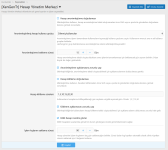
Anonimleştirme bekleme süresi: Yönetici, doğrulanmış bir anonimleştirme talebinin ne kadar süre bekletileceğini sistem seçeneklerinden belirleyebilir. Bu yapı, anonimleştirme gibi önemli ve geri dönüşü olmayan işlemlerin anında uygulanmasını engelleyerek yönetime ek kontrol sağlar.
Hesap anonimleştirildiğinde ne olur?
[XenGenTr] Hesap Yönetim Merkezi, anonimleştirme işlemi sırasında kullanıcı hesabını XenForo veritabanından tamamen silmek yerine, hesabı kişisel bilgilerden arındırılmış ve etkisiz hale getirilmiş bir kullanıcı kaydına dönüştürür.
Bu yaklaşımın temel amacı, kullanıcının kişisel verilerini anonim hale getirirken XenForo içerisindeki kullanıcı–içerik ilişkilerinin ve forum veri bütünlüğünün mümkün olduğunca korunmasıdır.
Kullanıcı kaydı korunur
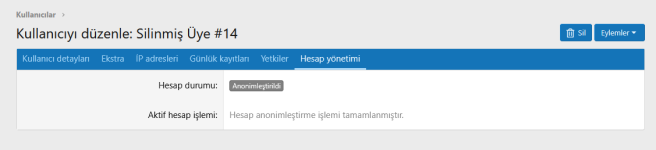
Anonimleştirme sırasında xf_user kaydı tamamen silinmez. Kullanıcı sistem içerisinde anonim bir kayıt olarak varlığını sürdürür.
Kullanıcı ID (user_id) değiştirilmez
Kullanıcının XenForo tarafından atanmış benzersiz kullanıcı ID numarası korunur. Böylece kullanıcıya bağlı konu, mesaj ve diğer içeriklerin mevcut ilişkilerinin gereksiz yere bozulmasının önüne geçilir.
Kullanıcı adı anonim hale getirilir
Mevcut kullanıcı adı kaldırılarak yönetici tarafından belirlenen anonim kullanıcı adı formatıyla değiştirilir.
Örneğin yönetici anonim kullanıcı adı için:
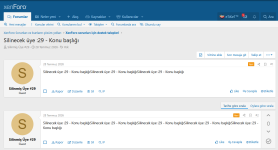
Silinmiş Üyeifadesini belirlemişse sistem benzersiz kullanıcı ID'sini kullanarak kullanıcıyı şu şekilde anonimleştirebilir:
Silinmiş Üye #29Böylece gerçek kullanıcı adı sistemden kaldırılırken her anonim hesap için ayırt edilebilir bir kullanıcı adı oluşturulur.
E-posta ve kişisel hesap bilgileri temizlenir
Anonimleştirme kapsamına alınan e-posta adresi, profil bilgileri ve kullanıcıyla doğrudan ilişkilendirilebilecek diğer hesap verileri temizlenir veya anonim hale getirilir.
Kullanıcı etkisiz bir kullanıcı grubuna taşınır
Anonimleştirme tamamlandığında kullanıcı, yönetici tarafından sistem seçeneklerinden belirlenen anonimleştirilmiş kullanıcı grubuna taşınır.
Bu grup için XenForo kullanıcı grubu izinleri kullanılarak forum üzerinde herhangi bir işlem yapamayacak şekilde kısıtlamalar uygulanabilir. Böylece anonimleştirilmiş hesap sistem içerisinde korunurken aktif bir kullanıcı hesabı olarak kullanılması engellenebilir.
Forum içerikleri korunur
Kullanıcının konu ve mesajlarının doğrudan silinmesi yerine mevcut içerikler mümkün olduğunca korunur. İçerikler anonim hale getirilmiş kullanıcı hesabıyla ilişkili kalmaya devam eder.
Bu sayede bir kullanıcının anonimleştirilmesi; eski tartışmaların, konu akışlarının ve diğer kullanıcıların mesajlarının anlam bütünlüğünün bozulmasına neden olmaz.
Hesap tekrar kullanılabilir aktif bir hesaba dönüştürülmez
Anonimleştirme işlemi tamamlandığında hesap normal kullanıcı hesabı niteliğini kaybeder. Anonim kullanıcı grubu ve temizlenen hesap bilgileri sayesinde kayıt sistem içerisinde yalnızca gerekli ilişkilerin korunmasına hizmet eden etkisiz bir kullanıcı kaydı olarak tutulabilir.
Neden kullanıcı tamamen silinmiyor?
XenForo içerisinde bir kullanıcı yalnızca kullanıcı adı ve e-posta adresinden oluşmaz. Kullanıcı hesabı; konular, mesajlar ve sistem içerisindeki çeşitli kayıtlarla ilişkilidir.
Bu nedenle Hesap Yönetim Merkezi'nin anonimleştirme sistemi, kullanıcı kaydını doğrudan ortadan kaldırmak yerine kişisel verileri anonim hale getirerek temel kullanıcı kaydını koruma yaklaşımını kullanır.
Böylece hem kullanıcı gizliliğinin korunmasına yönelik teknik araçlar sağlanır hem de XenForo'nun veri ve içerik bütünlüğünün gereksiz yere bozulmasının önüne geçilir.
Teknik olarak neler korunur, neler değişir?
| Veri / İşlem | Anonimleştirme sonrası |
|---|---|
user_id |  Korunur Korunur |
xf_user kaydı | Korunur |
| Kullanıcı adı |  Anonim ad ile değiştirilir Anonim ad ile değiştirilir |
| E-posta adresi |  Temizlenir / anonimleştirilir Temizlenir / anonimleştirilir |
| Profil bilgileri | Tamamen temizlenir |
| Kullanıcı grubu | Yönetici tarafından belirlenen gruba taşınır |
| Konular | Korunur |
| Mesajlar | Korunur |
| İçerik ilişkileri | Mümkün olduğunca korunur |
| Hesabın normal kullanımı |  Etkisiz hale getirilir Etkisiz hale getirilir |
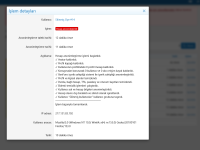
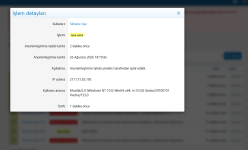
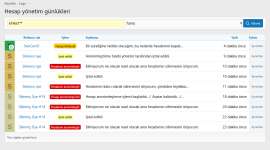
Detaylı Hesap İşlem Kayıtları
[XenGenTr] Hesap Yönetim Merkezi, hesap üzerinde gerçekleştirilen önemli işlemleri kayıt altına alarak yöneticilerin süreçleri takip edebilmesini sağlar.
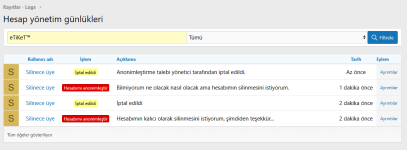
Hesap kilitleme, kilidin kaldırılması, anonimleştirme talebi ve anonimleştirme gibi sistem tarafından takip edilen işlemler Hesap İşlem Kayıtları alanından görüntülenebilir.
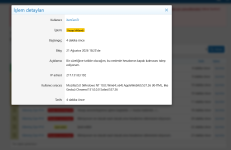
Her işlem kaydında, işlemin türüne göre ilgili bilgiler saklanır ve yöneticinin gerektiğinde geçmiş işlemleri inceleyebilmesine olanak sağlanır.
Kayıt altına alınabilen bilgiler arasında:
- İşlemin gerçekleştirildiği kullanıcı
- Gerçekleştirilen işlem türü
- İşleme ait açıklama ve detaylar
- İşlem tarihi ve saati
- Kullanıcının tarayıcı / cihaz bilgisi
Neden İşlem Kayıtları Tutuluyor?
Hesap kilitleme ve anonimleştirme gibi işlemler kullanıcı hesabının durumunu veya kişisel bilgilerini doğrudan etkileyebilir. Hesap İşlem Kayıtları sistemi, bu işlemlerin kontrolsüz ve iz bırakmadan gerçekleştirilmesi yerine, yönetici tarafından gerektiğinde incelenebilecek bir işlem geçmişi oluşturulmasını sağlar.
Features
- Time-based account locking system
- 6-digit security verification via SMS or email
- Automatic lock duration tracking and account unlocking
- Secure account anonymization system
- Configurable anonymization waiting period
- Administrator control over anonymization requests
- Anonymization that preserves user ID and content relationships
- Customizable anonymous username —
Deleted Member #29 - Move anonymized users to a designated user group
- Anonymize user data while preserving threads and posts
- Detailed account action logs
- IP address and device/browser information logging
- Filterable action history
- Administrator controls directly from the user profile
- Structure designed to support KVKK and personal data management processes
How does account locking work?
Step 1 — The account lock process is initiated
The user selects the Lock My Account option from the Account Management Center. They choose how long the account should remain locked and may optionally add a description regarding the action.
Step 2 — Security verification is performed
The action is not applied immediately. To protect the account owner and prevent unauthorized actions, additional verification is required. Depending on the system configuration, verification is completed using a 6-digit one-time verification code sent via SMS or email.
Step 3 — The account is locked
Once verification is successfully completed, the account is locked for the selected period. Even if the user accesses their account, they cannot use the forum normally and are informed that their account is currently locked.
Step 4 — The lock duration is tracked
The start and end dates are recorded by the system. The action is also added to the account action logs.
Step 5 — The account is automatically unlocked when the period ends
When the specified lock period expires, the system automatically unlocks the account. There is no need to modify the user's group or the core XenForo account structure.
Administrator control: When necessary, an administrator can view the user's current account status, review the active account lock, and manually unlock the account.
How does account anonymization work?
Step 1 — An anonymization request is created
The user submits a request to anonymize their account through the Account Management Center. Before proceeding, the effects of anonymization on the account are clearly presented to the user.
Step 2 — Security verification is performed
Because anonymization may result in extensive and irreversible changes to the account, the request is not processed immediately. To verify that the request is being made by the actual account owner, a 6-digit one-time verification code is sent via SMS or email, depending on the system configuration. An anonymization request cannot be created until verification has been successfully completed.
Step 3 — The anonymization request enters the waiting period
After security verification is completed, anonymization is not performed immediately. The request remains pending for the “Anonymization waiting period” configured by the administrator.
This period can be configured by the site administrator, allowing the forum administration to control how long a request must wait before anonymization is performed.
Step 4 — The administrator can monitor the request
During the waiting period, the anonymization request can be viewed by administrators and the process can be monitored. The administrator can review the user's request and its current status directly from the user account.
Step 5 — The waiting period is completed
Once the administrator-defined waiting period has expired, the request becomes eligible for anonymization. This ensures that a sensitive account action is handled through a controlled process rather than being applied immediately after verification.
Step 6 — The account is anonymized
Once the process is completed, the anonymization system takes effect. The username, email address, and other personal account information covered by the anonymization process are removed or modified so that they can no longer be directly associated with the user.
Step 7 — Forum content is preserved
Threads and posts created by the user are preserved whenever possible. This allows the account owner's personal information to be anonymized without disrupting the integrity of forum content and discussions.
Step 8 — The action is logged
Important actions performed during the anonymization process are logged, allowing administrators to review and track the actions that have been carried out.
Anonymization waiting period: The administrator can specify in the system options how long a verified anonymization request must remain pending. This structure provides administrators with additional control by preventing important and irreversible actions such as anonymization from being applied immediately.
What happens when an account is anonymized?
[XenGenTr] Account Management Center does not completely delete the user account from the XenForo database during anonymization. Instead, it converts the account into an inactive user record from which personal information has been removed.
The primary purpose of this approach is to anonymize the user's personal data while preserving XenForo's user-content relationships and overall forum data integrity whenever possible.
The user record is preserved
During anonymization, the xf_user record is not completely deleted. The user continues to exist within the system as an anonymous record.
The user ID (user_id) is not changed
The unique user ID assigned by XenForo is preserved. This helps prevent unnecessary disruption to existing relationships between the user and their threads, posts, and other content.
The username is anonymized
The existing username is removed and replaced with the anonymous username format configured by the administrator.
For example, if the administrator has configured the anonymous username as:
Deleted Memberthe system can use the unique user ID to anonymize the user as follows:
Deleted Member #29This removes the real username from the system while creating a distinguishable username for each anonymized account.
Email address and personal account information are cleared
The email address, profile information, and other account data that can be directly associated with the user and are included in the anonymization process are cleared or anonymized.
The user is moved to an inactive user group
Once anonymization is completed, the user is moved to the anonymized user group selected by the administrator in the system options.
XenForo user group permissions can be configured to prevent members of this group from performing any actions on the forum. This allows the anonymized account to remain in the system while preventing it from being used as an active user account.
Forum content is preserved
Instead of directly deleting the user's threads and posts, existing content is preserved whenever possible. The content remains associated with the anonymized user account.
As a result, anonymizing a user does not unnecessarily disrupt the context and integrity of existing discussions, thread flows, or messages posted by other users.
The account cannot be restored as a normally usable active account
Once anonymization is completed, the account loses its status as a normal user account. Through the anonymized user group and cleared account information, the record can remain in the system solely as an inactive user record required to preserve necessary relationships.
Why isn't the user completely deleted?
In XenForo, a user consists of more than just a username and email address. A user account is associated with threads, posts, and various other records throughout the system.
For this reason, the Account Management Center's anonymization system uses an approach that anonymizes personal data while preserving the core user record instead of directly removing the user record.
This provides technical tools designed to protect user privacy while also preventing unnecessary disruption to XenForo's data and content integrity.
What is technically preserved and what is changed?
| Data / Action | After anonymization |
|---|---|
user_id | Preserved |
xf_user record | Preserved |
| Username | Replaced with an anonymous username |
| Email address | Cleared / anonymized |
| Profile information | Completely cleared |
| User group | Moved to the group selected by the administrator |
| Threads | Preserved |
| Posts | Preserved |
| Content relationships | Preserved whenever possible |
| Normal account usage | Disabled |
Detailed Account Action Logs
[XenGenTr] Account Management Center records important actions performed on user accounts, allowing administrators to monitor and review these processes.
System-tracked actions such as account locking, account unlocking, anonymization requests, and account anonymization can be viewed in the Account Action Logs section.
Each log entry stores relevant information according to the type of action performed, allowing administrators to review previous account actions whenever necessary.
Information that can be recorded includes:
- The user associated with the action
- The type of action performed
- Description and details of the action
- Date and time of the action
- The user's browser / device information
Why are action logs kept?
Actions such as account locking and anonymization can directly affect the status of a user account or its personal information. The Account Action Logs system creates a reviewable history of these actions, allowing administrators to inspect them when necessary instead of having sensitive account operations performed without oversight or traceability.